
The PoolLab 2 photometer from Water-i.d. removes the entire chain of manual steps between testing your pool water and getting a compliance record. It measures pH, free chlorine, total chlorine, alkalinity, and cyanuric acid with laboratory-grade precision — and now, it pushes those results directly into your PoolComply compliance log over WiFi. You test the water, press the WiFi button, and the chemistry is already in your log before you've walked back to the plant room.
This is the integration I built PoolComply to eventually have. Here's exactly how it works.
What is the Water-i.d. PoolLab 2?
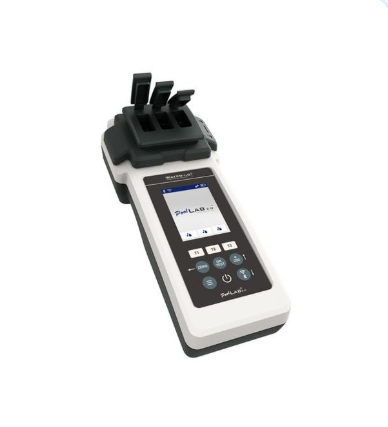
The PoolLab 2 is a professional photometer — the same technology used in laboratory water analysis, in a handheld device you can dip in your pool. Unlike DPD comparator tests that rely on visual colour matching, the PoolLab 2 uses four-wavelength LED photometry to produce objective, consistent readings that aren't affected by your eyesight, ambient light, or how long since you last changed your test reagents.
Key specifications relevant to pool compliance:
| Parameter | Range | Method |
|---|---|---|
| pH | 6.50 – 8.40 | Phenol Red (tablet or liquid) |
| Free Chlorine (fCl) | 0.00 – 6.00 mg/l | DPD 1 tablet |
| Total Chlorine (tCl) | 0.00 – 6.00 mg/l | DPD 3 tablet |
| Combined Chlorine (cCl) | Calculated | tCl minus fCl |
| Alkalinity | 0 – 200 mg/l | Alkalinity-M tablet |
| Cyanuric Acid | 0 – 100 mg/l | CYA Test tablet |
Crucially, it can measure up to three parameters simultaneously in its triple cuvette — so you can run pH, free chlorine, and total chlorine in one test cycle rather than three separate ones.

PWTAG note: Photometric testing is the recommended method for commercial pool water analysis in the PWTAG Code of Practice. Results are objective, consistent, and not subject to interpretation errors — which is why insurers and HSE inspectors increasingly expect to see them.
How the PoolComply Integration Works
The integration works via the PoolLab 2's built-in WiFi. When you press the WiFi button on the device after taking a measurement, it connects to your network and sends the results directly to PoolComply. No app, no cable, no intermediary — the data goes from the device to your compliance log in seconds.
Here's the flow from poolside to log:
🧪 Take your measurement
Add your reagent tablet to the cuvette, dip the PoolLab 2, and press OK/Test. The device reads your water sample using LED photometry and displays your results on screen. The whole test cycle takes about 90 seconds for a triple measurement.
📡 Press the WiFi button
One button press. The PoolLab 2 connects to your WiFi network and pushes the results — pH, free chlorine, total chlorine — directly to PoolComply. No typing. No transcription. The device also selects the correct pool from the list you set up during registration.
📋 Complete the log entry
Open PoolComply on your phone or tablet. A banner shows that new photometer readings are available. Tap Apply readings — the chemistry fields are pre-filled from the device. You add the remaining manual fields (bather count, water clarity, dosing unit readings) and submit. Combined chlorine is calculated automatically.
✓ The result: A complete, PWTAG-compliant water test record — attributed to you, timestamped, status-checked against PWTAG limits — in the time it would have taken you to write the numbers on a paper logbook.
What the PoolLab 2 Measures — and What Doesn't Sync Automatically
It's worth being clear about what the photometer integration covers. The PoolLab 2 measures chemistry — it cannot measure bather numbers, water clarity, or dosing unit readings. Those still need to be entered manually when you complete the log.
✅ Pre-filled automatically from the PoolLab 2
- pH — measured directly, not estimated
- Free chlorine (fCl) — DPD 1 method, 0.00–6.00 mg/l
- Total chlorine (tCl) — DPD 3 method, 0.00–6.00 mg/l
- Combined chlorine (cCl) — calculated automatically as tCl minus fCl
- Alkalinity — when measured in the same session
- Cyanuric acid — when measured in the same session
✏️ Still entered manually
- Number of bathers
- Water clarity (clear / slightly hazy / hazy)
- Dosing unit readings (if applicable)
- Water temperature (not measured by photometry)
- Any corrective actions taken
This hybrid approach is deliberate. The PoolLab 2 handles the chemistry you can't reliably do by eye — the stuff that has to be right for PWTAG compliance. The manual fields capture the operational context that a photometer can't observe. Together, they produce a complete, audit-ready record.
Getting Started: Setup Takes About 10 Minutes
Setting up the PoolLab 2 integration with PoolComply is a one-time process that takes around 10 minutes. You'll need your PoolLab 2, a laptop or Android phone with Chrome or Edge, and your WiFi network name and password.
- Register your device in PoolComply — go to Settings > Devices > Add Device. Enter your serial number (on the back of the device). PoolComply generates a unique device token — keep this page open.
- Open the PoolComply setup tool — visit poolcomply.co.uk/setup in Chrome or Edge. Enable Bluetooth on your laptop or Android phone.
- Connect to your PoolLab 2 via Bluetooth — double-press the lower-right button on the device to enable Bluetooth (the icon turns green). Click Connect in the setup tool and select your device.
- Enter your WiFi details — the setup tool configures your device: account credentials, pool list, timezone, and clock. This takes about 30 seconds.
- Take your first test — the PoolLab 2 will now push results to PoolComply whenever you press the WiFi button after testing.
iPhone users: Apple blocks Web Bluetooth in Safari and Chrome on iOS. If you're setting up on an iPhone, use the LabCOM app (free on the App Store) for the WiFi and credentials step only. The full getting started guide at poolcomply.co.uk/setup covers the iPhone alternative path.
WiFi note: The PoolLab 2 requires a 2.4GHz WiFi network. If your facility router broadcasts both 2.4GHz and 5GHz bands, make sure you connect the device to the 2.4GHz network name.
Why This Matters for Compliance
The honest answer is: errors in pool chemistry records are a liability. If your water test log shows free chlorine of 1.2 mg/l but your photometer would have read 0.4 mg/l, you have a compliance problem — either a transcription error or a test that wasn't done properly. Either way, if a waterborne illness incident leads to an investigation, that discrepancy is exactly what an investigator looks for.
Direct photometer sync eliminates two of the three most common sources of error in pool compliance records:
- Transcription errors — values written down incorrectly when copying from the device display
- Interpretation errors — values estimated by eye from a comparator block in poor light conditions
The third source — human error in actually carrying out the test — is reduced by the PoolLab 2's guided measurement process and the fact that it tells you when you've done something wrong (residue in the cuvette, insufficient reagent dissolved, etc.).
For hotel, spa, and leisure centre operators who hold personal liability for pool water quality under HSG179 and the Health and Safety at Work Act, having an objective, device-generated record that feeds directly into a timestamped, attributed compliance log is a meaningful risk reduction — not just a convenience.
How to Get the PoolLab 2 Integration
The integration is available to all PoolComply subscribers. If you already have a PoolLab 2, you can register your device in Settings and follow the setup guide. If you don't have one yet, the PoolLab 2 is available directly from Water-i.d. at poollab.org.
Ready to Eliminate Manual Chemistry Entry?
Set up the PoolLab 2 integration in your PoolComply account — or start a free 30-day trial and try it from day one.
Start Free Trial →The full getting started guide — including the step-by-step setup walkthrough and the iPhone alternative process — is available at:
📖 Getting Started Guide: poolcomply.co.uk/setup.php — takes you from unboxing to first sync in around 10 minutes.
If you have questions about the integration or run into issues during setup, contact us at support@poolcomply.co.uk. I set this up myself on our spa facility at The Coniston Hotel, so I know exactly where the tricky bits are.